Introducing the TIDRADIO Wireless Bluetooth Programmer
Adapter, your ultimate solution for programming Ham radios
like the Baofeng UV-5R and many others without needing cumbersome
cables and a PC setup. This innovative device empowers you to
program your radios directly via Bluetooth, bringing a new level of
convenience to your outdoor adventures and spontaneous
communication needs. The seamless integration with the
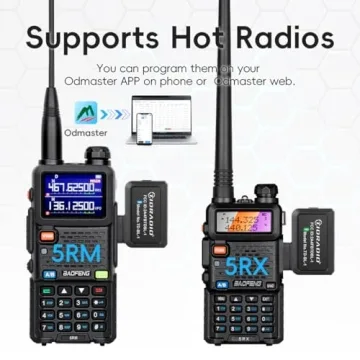
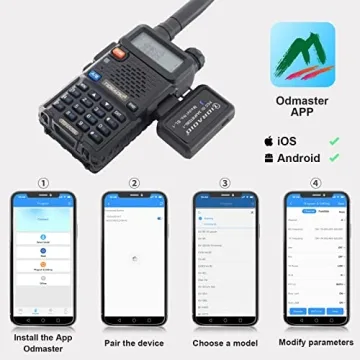
Odmaster App allows you to view and edit channel
configurations...
Show more Introducing the TIDRADIO Wireless Bluetooth Programmer Adapter, your ultimate solution for programming Ham radios like the Baofeng UV-5R and many others without needing cumbersome cables and a PC setup. This innovative device empowers you to program your radios directly via Bluetooth, bringing a new level of convenience to your outdoor adventures and spontaneous communication needs. The seamless integration with the Odmaster App allows you to view and edit channel configurations directly on your mobile device or computer, ensuring that you always have the latest frequencies at your fingertips.
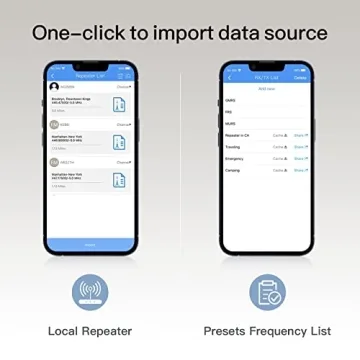
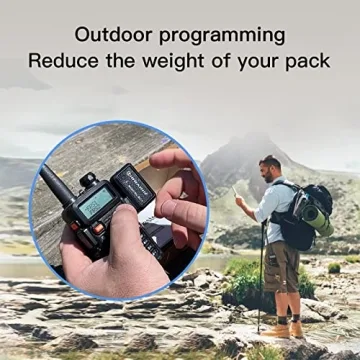
This programmer isn’t just a tool; it's an essential companion for enthusiasts, providing a user-friendly interface that transforms how you interact with your radio. Imagine programming your radio channels while off-roading, hiking, or in any remote location—no need for a desktop or complex setups. With the TIDRADIO programmer, you can quickly import your local repeater configurations and customize your settings effortlessly, vastly improving the efficiency of your communications.
One of the most notable features of this adapter is its lightweight and portable design. Easily fitting into your gear, you can charge it with the included USB-C cable, ensuring you’re always ready to connect. The blue LED indicator lights up to confirm that you're connected, keeping you informed throughout the programming process. Its compatibility with various radio models, such as GM-15 PRO and UV-21R, makes it a versatile choice for different user needs.
- Bluetooth Compatible: Say goodbye to wires - connect and program your radio wirelessly with ease.
- Real-time Updates: Quickly read and write channel configurations via the Odmaster app for on-the-go adjustments.
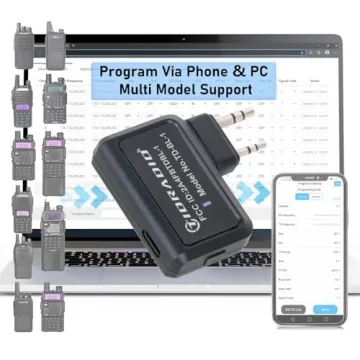
- Multi-Model Support: Compatible with various radio models, providing flexibility for different user needs.
- User-Friendly App Interface: The Odmaster app simplifies the programming process, making it accessible for all users, regardless of technical skill.
- Compact Design: Lightweight and easy to carry, the device is perfect for outdoor adventures where communication is key.
- Durable Build: Designed to withstand outdoor elements, ensuring longevity and reliability in any condition.
Who Will Love This Product?
- Amateur Radio Operators seeking easy programming solutions.
- Outdoor Enthusiasts who need quick and flexible communication tools.
- Emergency Services Personnel who require efficient programming capabilities.
- Technically inclined individuals looking for a modern programming tool.
- Everyone in the HAM radio community wanting to simplify their channel management.
Best Occasions to Use This Gift:
This device is perfect for a variety of occasions including:
- Outdoor adventures like camping and hiking.
- Emergency preparedness and communication drills.
- Off-roading excursions with friends and family.
- Everyday use for radio communication enthusiasts.
- Technical workshops or Ham radio meets.
Comparison with Competitors
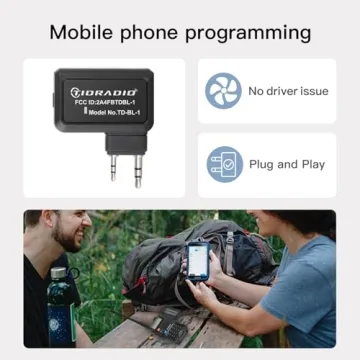
In comparison to other wireless programming devices in the market, the TIDRADIO Wireless Programmer Adapter stands out due to its comprehensive compatibility with various radio models and its intuitive app interface, which provides users with real-time management capabilities. While other devices may require additional software or cumbersome installations, the TIDRADIO adapter's plug-and-play connection ensures that users get connected without hassle. Additionally, its compact and durable design makes it ideal for all adventures, setting it apart from competitors who may offer similar functionality but lack practical usability.
Why You Will Love This Product?
The TIDRADIO Wireless Bluetooth Programmer Adapter is designed to enhance your radio experience profoundly. Imagine the confidence of setting up your radio channels swiftly and accurately while enjoying the great outdoors. No more frustration with small keypads or tedious manual entries—this device allows you to focus on what matters most, ensuring you can communicate effortlessly with your team. With its reliable connectivity and ease of use, it will not only improve your programming experience but also restore peace of mind knowing you can stay connected wherever your adventures take you.
Less








 Continue with Google