Introducing the XPPen Deco 02 Digital Graphics Drawing
Tablet, a game-changer in the world of digital artistry!
Crafted for both novices and seasoned professionals, this tablet
showcases a superior blend of advanced technology and thoughtful
design. With its standout features such as the elegant
silver roller with hollow mirror plating and a
passive pen (P06) that mimics the grip of a
traditional pencil, this tablet enhances your creative workflow and
artistry...
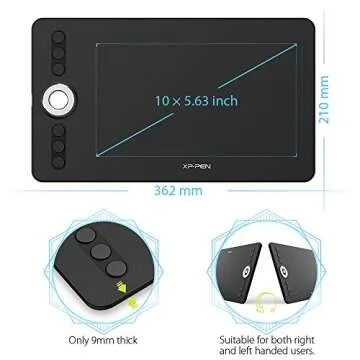
Show more Introducing the XPPen Deco 02 Digital Graphics Drawing Tablet, a game-changer in the world of digital artistry! Crafted for both novices and seasoned professionals, this tablet showcases a superior blend of advanced technology and thoughtful design. With its standout features such as the elegant silver roller with hollow mirror plating and a passive pen (P06) that mimics the grip of a traditional pencil, this tablet enhances your creative workflow and artistry experience. The tablet is only 9mm thin, making it incredibly portable without sacrificing durability. Whether you're sketching in a café or illustrating at home, the XPPen Deco 02 is your perfect companion.
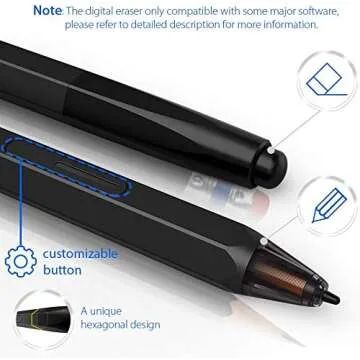
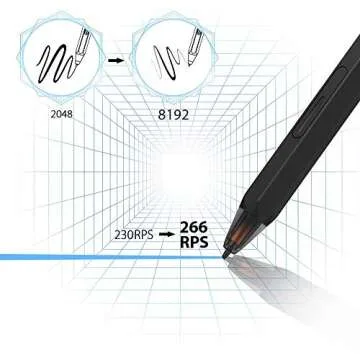
This tablet doesn’t just look good; it performs exceptionally well with a stunning 8192 levels of pen pressure sensitivity and a rapid 266 RPS report rate. Experience unparalleled precision as every stroke adjusts according to your artistic style. The dual-functioning pen, featuring an eraser, allows for effortless transitions between drawing and erasing, making your creative process smoother than ever. Its generous working area of 10 x 5.63 inches offers ample space for creating detailed artwork, giving you the freedom to explore your creativity without restrictions.
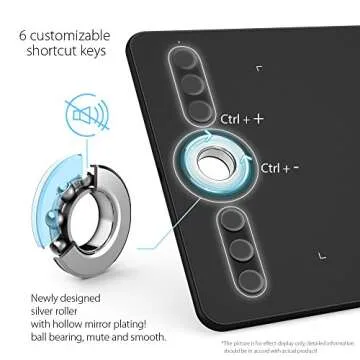
Designed with user convenience in mind, the XPPen Deco 02 includes six customizable shortcut keys positioned for maximum efficiency. These keys allow you to create shortcuts to your most-used functions, enhancing your productivity and streamlining your artistic workflow. Compatible with various operating systems including Windows and Mac, it supports a wide array of design software, such as Photoshop, Illustrator, and more, ensuring you work seamlessly with the tools you're familiar with.
In summary, if you are seeking a reliable, high-performance drawing tablet that marries functionality with aesthetics, the XPPen Deco 02 is your ideal choice. It not only meets but exceeds expectations for digital artists, offering a harmonious blend of technology and artistry that will transform the way you create.
- Elegant Design: Silver roller with hollow mirror plating for a sleek look.
- Passive Pen Technology: Battery-free, lightweight, and ergonomic design for comfort during long sessions.
- Impressive Sensitivity: 8192 levels of pressure sensitivity to capture every detail with finesse.
- Customizable Shortcuts: Six programmable keys for a more efficient workflow tailored to your style.
- Portable & Durable: Only 9mm thick, designed for ease of transport without losing strength.
- Wide Compatibility: Works with Windows, Mac, and popular design software like Photoshop and Krita.
Target Audience
- Professional digital artists looking for high-quality performance without high costs.
- Students and beginners wanting to explore digital drawing and illustration.
- Graphic designers seeking an affordable yet powerful pen tablet for their projects.
- Photo editors interested in enhancing their retouching capabilities.
- Hobbyists who enjoy digital art and want an effective tool for their craft.
Best Occasions to Use This Gift
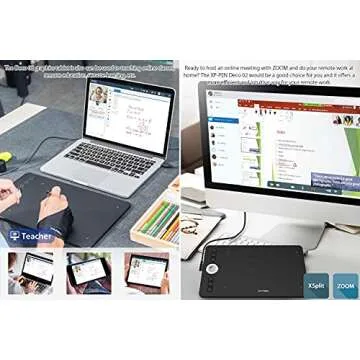
Perfect for Art Classes and Workshops: The XPPen Deco 02 is an ideal companion for students and art enthusiasts alike, allowing for on-the-go creativity and learning.
- Birthdays of aspiring digital artists.
- Graduation gifts for art students entering the digital landscape.
- Anniversaries for professional designers or photo editors.
- Holidays like Christmas, when creativity is in the air.
Comparison with Competitors
The XPPen Deco 02 distinguishes itself in a crowded market, particularly when placed side-by-side with other leading brands like Wacom. Although Wacom tablets have a legacy of reliability, the Deco 02's cost-effectiveness makes it an attractive alternative for those on a budget. Users review its exceptional performance with software like Photoshop and Krita, often citing that it functions better than models priced significantly higher. Unlike some competitors, the XPPen Deco 02 comes with an ergonomic pen that includes an eraser, a feature many high-end tablets eliminated, giving it a unique edge.
Why You Will Love This Product?
Elevate Your Creativity: The XPPen Deco 02 isn't just a tablet; it's an extension of your artistic expression. Its intuitive design and user-friendly features cultivate an engaging experience, allowing your ideas to thrive. As you glide your pen across the tablet's surface, you feel the empowerment of tools that adapt to every nuance of your style. Whether you're sketching an imaginative landscape or refining a graphic design, the Deco 02 ensures fluidity in every aspect of your creative endeavor.
Less











 Continue with Google