




Elevate Your Laptop Experience with Essential Upgrades
In the fast-paced world of technology, staying ahead of the game is crucial, whether you are a gaming enthusiast or a dedicated professional. Upgrading your laptop isn’t just about keeping up with trends; it’s about optimizing your performance, enhancing your productivity, and ensuring that your machine meets your needs efficiently. This carefully curated list focuses on essential laptop upgrades and accessories, vital for anyone looking to make a significant impact on their computing experience.
Finding the right upgrade or accessory can often feel overwhelming, especially with the multitude of options available. This guide streamlines your decision-making process, making it easier to discover high-quality items that will transform your laptop into a powerhouse while also providing thoughtful gift ideas for the tech-savvy person in your life.
Supercharge Your Storage with High-Speed SSD Enclosures
Storage capacity and speed are paramount for laptop users, especially for those who manage large files or require fast access to applications. Investing in high-speed SSD enclosures can dramatically enhance your system's performance. One standout option is the ACASIS 40Gbps M.2 NVMe SSD Enclosure, designed with tool-free installation and Thunderbolt compatibility. This enclosure allows you to easily upgrade your storage without the hassle of complicated setups.
For those looking for a compact solution, the ACASIS 40Gbps M.2 NVMe SSD Enclosure - Compact and High-Speed Solution for All Devices is a perfect choice. It's versatile and compatible with various devices, making it an ideal upgrade for anyone aiming for a smoother computing experience.
Boost Your Laptop’s Memory with Top-Notch RAM Options
Enhancing your laptop's memory is a game changer, particularly for users running memory-intensive applications. The Crucial 16GB DDR4 RAM 2400MHz CL17 Laptop Memory is designed specifically for Mac-based systems, providing a solid upgrade for anyone needing reliable performance and efficiency. Adding more RAM can lead to faster processing times and improved multitasking capabilities—a must for professionals and gamers alike.
If you're looking for even more memory capacity, check out the Crucial RAM 32GB DDR5 4800MHz CL40 Laptop Memory. This option supports both Intel and AMD systems and delivers unmatched speed and performance for those who demand the best from their laptops.
Enhance Connectivity with Versatile Docking Stations
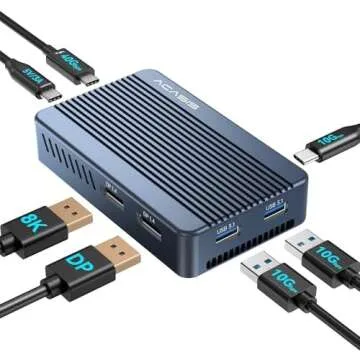
A good docking station can transform your laptop experience, offering a single hub for all your devices. The ACASIS Mac Mini Dock – Dual Monitor 40Gbps NVMe Hub features a cooling fan and supports dual monitors, making it an excellent choice for those who work with multiple screens. This dock not only elevates your productivity but also keeps your system cool, allowing for longer work sessions without overheating.
Another great option is the Sabrent USB 3.2 Type-C Tool-Free M.2 PCIe NVMe & SATA SSD Enclosure. This easy-to-use enclosure simplifies access to your storage devices and enhances your connectivity options, making it a fantastic addition to any laptop setup.
Choosing the Right Upgrades for Your Lifestyle
When selecting laptop upgrades and accessories, consider your lifestyle and how you use your laptop daily. For gamers, a high-speed SSD enclosure can provide faster load times and an overall smoother experience. Conversely, professionals working with large datasets will benefit immensely from increased RAM, enabling better multitasking and speed. Understanding your specific needs is essential in making informed purchasing decisions.
Moreover, remember that investing in quality accessories and upgrades enriches your laptop's value and longevity. Upgrades like those highlighted today not only boost performance but also enhance user experience, ensuring you can accomplish more with ease.
Frequently Asked Questions
What are the benefits of upgrading my laptop storage?
Upgrading your laptop storage with an SSD can significantly increase your device's speed, reduce boot times, and improve the overall performance. SSDs are faster than traditional HDDs, leading to quicker access to files and applications.
How much RAM do I need for efficient multitasking?
For average usage, 8GB of RAM is sufficient; however, for professional use or gaming, 16GB or more is recommended. This allows for better multitasking capabilities and smoother application performance.
Can I add more RAM on my own?
Yes, most laptops allow for memory upgrades, but it's essential to check your device's specifications and user manual. Installing RAM typically only requires basic technical skills.
Are docking stations worth the investment?
Absolutely! Docking stations offer greater connectivity and ease of use, allowing you to connect multiple devices easily. They can enhance productivity, especially for users who regularly switch between different setups.
Conclusion
Upgrading your laptop doesn’t need to be daunting. With the right upgrades and accessories in place, you can greatly enhance your computing experience. Whether you’re looking to boost memory, improve storage speed, or enhance connectivity, our curated selection provides options for every user type. Each product mentioned not only serves a practical function but also offers value in performance, making them ideal for personal use or as thoughtful gifts.
Explore your favorites now and transform your laptop into the high-performing tool you deserve. Happy shopping and enjoy your upgraded laptop experience!



 Continue with Google