







Transform Your Note-Taking Experience
In today's fast-paced world, staying organized and productive is more important than ever. If you're tired of dealing with bulky notebooks and losing important notes on scraps of paper, now is the perfect time to embrace technology. Whether you're a student, a professional, or someone who simply loves to jot down ideas, a well-curated Digital Notes Setup can revolutionize the way you manage your tasks and thoughts. This article details the ideal digital note-taking setup that combines ease of use, portability, and sleek design to enhance your organizational skills.
Gone are the days of frantically searching for that one page with your brilliant idea or the coffee-stained planner that holds your best intentions. With a few key tools, you can digitize your note-taking and access your ideas anytime, anywhere. My recommended setup incorporates a tablet or laptop with a stylus and a versatile note-taking app. Let's dive into the essentials you need for your Digital Notes Setup.
Essential Tools for Your Digital Notes Setup
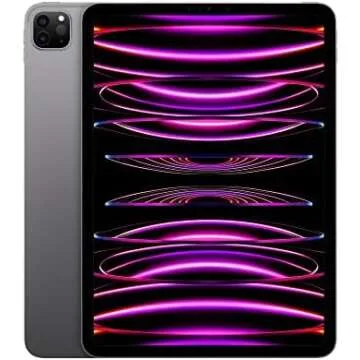
The foundation of any great digital note-taking system starts with the right devices. A solid tablet or laptop is essential for smooth operation and convenience. Among my top recommendations is the 2020 Apple iPad Air. With a 10.9-inch display, this powerful device offers a perfect blend of performance and portability. Plus, its compatibility with the Apple Pencil makes it ideal for seamless note-taking experiences. From lectures to meetings, you'll appreciate its sleek design and easy navigation.
To elevate your note-taking further, consider using the Apple Pencil 2nd Gen. This stylus features precision and low latency, making it easy to jot down notes quickly or illustrate your ideas with finesse. When paired together, the iPad Air and Apple Pencil create an elegant note-taking duo.
Optimize Your Viewing with the Right Stand
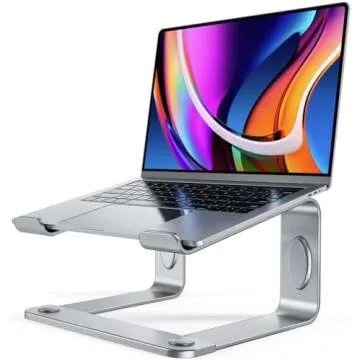
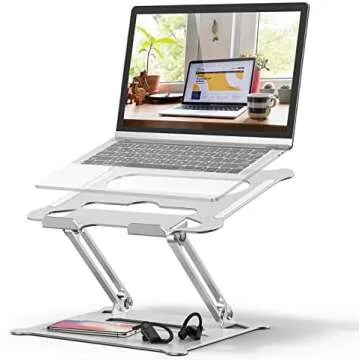
Once you have the right tablet, next comes ensuring you can view and use it comfortably. The SAIJI Height Adjustable Tablet Stand is an excellent addition to your setup. This stand is not only height adjustable but also 360° rotatable, making it easy to find the perfect angle for writing or reading. It's perfect for proping up your tablet when on a desk or table, allowing you to type with ease while using the touchscreen.
Incorporating a great stand into your setup can significantly enhance your productivity as it minimizes strain on your neck and wrists. It makes conferencing calls or studying much more comfortable and efficient. Investing in the right stand is crucial to creating a workspace that promotes productivity.
Protect and Enhance Your Tablet
Protecting your valuable device is essential. The ESR for iPad Air Case offers not only protection but also a slim, trifold stand that allows for flexible positioning. It supports the Apple Pencil and comes in a stylish rose gold color, making it a fashionable yet practical choice. The lightweight design ensures that your tablet remains portable without sacrificing protection or style.
If you want to take your protection to the next level, don’t forget a screen protector. The Paperlike 2.1 Screen Protector is tailored for iPad and offers a writing experience similar to paper. Its matte finish reduces glare, making it easier on your eyes while ensuring your screen stays pristine.
Enhance Your Typing Experience
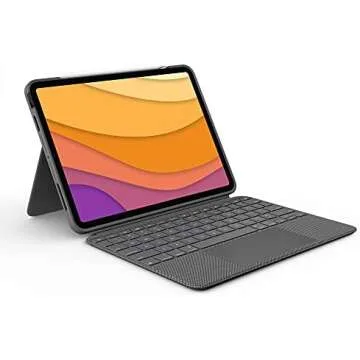
For those who prefer typing over handwriting, a high-quality keyboard will make your experience much smoother. Check out the Logitech Combo Touch iPad Air Keyboard Case. This case features a detachable backlit keyboard with a kickstand and trackpad, making it perfect for both work and play. The Smart Connector ensures that there are no Bluetooth pairing issues, creating a seamless transition from typing to surfing the web.
The integration of a keyboard into your digital notes setup allows for a more versatile experience, especially for long documents, taking meeting minutes, or drafting reports effortlessly. In addition, consider the Logitech K780 Wireless Multi-Device Keyboard if you want to control multiple devices including your PC, phone, and tablet from one keyboard.
Stay Powered and Connected
To ensure your digital note-taking tools are always ready to go, having a reliable wireless mouse can make navigating your tablet experience much more efficient. The Logitech M720 Triathlon Multi-Device Wireless Mouse is perfect for anyone looking for a mouse with a long battery life and multiple-device connectivity. Its versatile buttons allow you to quickly switch between devices, perfect for those who often multitask.
Additionally, it's crucial to have a well-organized workspace equipped with all the tools you need. From charging your Ipad, controlling your devices to easily jotting down notes, having the right accessories can drastically streamline your workflow.
Frequently Asked Questions
- What is the best tablet for note-taking? The 2020 Apple iPad Air is a top choice due to its performance and compatibility with the Apple Pencil, making it ideal for digital notes.
- Can I use my iPad for typing? Yes! Pairing it with a quality keyboard like the Logitech Combo Touch can enhance your typing experience.
- Do I really need a stand for my tablet? Using a stand will relieve neck strain and provide a better viewing angle, significantly improving comfort during use.
- How can I protect my iPad? Invest in a good case and a screen protector like the Paperlike 2.1 to keep your device safe from scratches and drops.
As we conclude, it's clear that having a well-thought-out Digital Notes Setup is indispensable in our daily lives. By utilizing these expertly curated tools, you can transition from traditional note-taking to a seamless digital experience. Remember, whether you're a student tackling lecture notes, a professional managing projects, or someone who embraces creativity, each piece of this setup complements your journey toward organization.
Explore your favorites now to elevate your note-taking skills and be on your way to a cleaner, more organized digital life. Don't hesitate to reach out to friends who might also benefit from this transition—they may just thank you later!



 Continue with Google