




My Essential Photography Accessories
If you're diving into the world of photography, whether as a hobbyist or a budding professional, you'll quickly realize that great images are often complemented by the right accessories. These tools not only help you take better photos but also make your photographic journey smoother and more enjoyable. In this guide, I’ll share the photography accessories that I find indispensable. Whether you're gift shopping or looking to enhance your own collection, this list will point you in the right direction.
Photography is as much about the tools as it is about the talent behind the lens. Having the right accessories can transform your workflow, enhance your creative possibilities, and sometimes even save your equipment from accidental damage. From reliable memory cards to protective gear, every item on this list serves a specific purpose that can elevate your photography game to new heights.
1. Reliable Memory Cards: SanDisk's Options
One of the most crucial accessories for any photographer is a reliable memory card. The SanDisk 32GB Extreme PRO SDHC UHS-I Memory Card offers exceptional speed and storage capabilities that make it ideal for shooting high-resolution images and 4K UHD video. With its Class 10, U3, and V30 ratings, you won't have to worry about lag or bottlenecks during critical shooting moments.
For those who need more capacity, especially for long shoots or when recording 8K video, the SanDisk 128GB Extreme PRO SDXC UHS-II Memory Card is a perfect choice. It ensures you can capture everything you need without constantly switching cards, thereby keeping your workflow seamless and efficient.
2. Camera Safety: Essential Protector Caps
While exploring outdoors to find that perfect shot, it's essential to protect your camera's sensitive areas. The VKO Camera Hot Shoe Cover Protector Cap is specifically designed for various Fujifilm models and is an excellent addition to your gear. This small accessory prevents dust and moisture from entering your camera's hot shoe, ensuring that your equipment remains functional and clean.
Consider this protector cap as a small investment towards prolonging the life of your camera. With countless adventures ahead, safeguarding your gear with this simple tool is practical and smart.
3. Go Hands-Free: Premium Straps
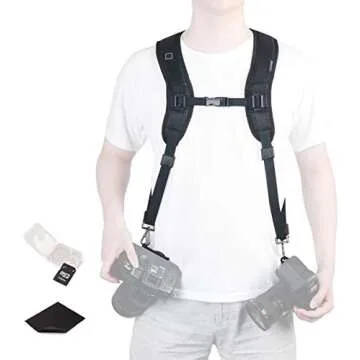
Comfort and convenience play a huge role in photography, especially if you’re out in the field for extended periods. The Peak Design Leash Camera Strap is not just versatile and durable; it allows you to quickly transition from carrying your camera to actively shooting. Its adjustable length means it can be worn however you prefer—around your shoulder or across your body.
For added security, the Peak Design Cuff Camera Wrist Strap is ideal for keeping your camera safely tethered to your wrist while you shoot. This way, you can stay relaxed knowing your valuable equipment is secure as you capture life’s moments.
4. Batteries: Keep Shooting
No photographer wants to be caught with a dead battery in the middle of a shoot. The Fujifilm NP-W235 Rechargeable Li-Ion Battery offers extended shooting time for your Fujifilm cameras, ensuring you never miss that perfect moment. Having a couple of these batteries on hand will give you peace of mind during long sessions.
Additionally, for photographers using older Fujifilm models, keep the Fujifilm NP-W126S Li-Ion Rechargeable Battery in your kit. It’s great to have the right battery available, so you’re always prepared to capture your vision.
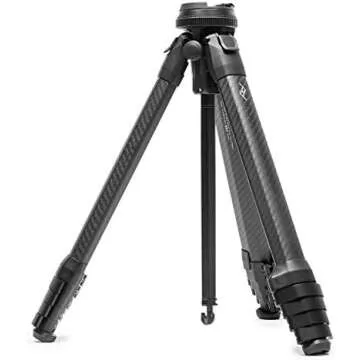
5. Tripods and Stabilization: The Peak Design Travel Tripod
To ensure your photos are sharp and well-composed, investing in a sturdy tripod is crucial. The Peak Design Travel Tripod is compact yet incredibly stable, making it perfect for travel photographers. This tripod not only helps with stability but also enhances your creative shooting perspective, enabling you to experiment with different angles and longer exposures.
For those moments when you want to prioritize portability without sacrificing quality, the Peak Design tripod is designed to be lightweight, fitting easily into your bag without taking up too much space, which is an essential consideration on location shoots.
6. Transferring Images: USB-C Reader
Efficiently transferring your photos from your memory card to your computer is crucial in today’s fast-paced digital environment. The SanDisk Extreme PRO SD UHS-II USB-C Reader speeds up the transfer process significantly thanks to its USB-C compatibility. This means you can quickly move images and videos without delays, allowing you to delete memory cards and prepare for your next shoot sooner.
Optimizing your workflow through smart accessories like this reader can be a game changer, especially when you are on a tight schedule or need to meet deadlines.
Frequently Asked Questions
- What photography accessories do I really need?
The essentials include dependable memory cards, stabilizing tripods, comfortable camera straps, and spare batteries. You can expand your kit with additional items based on your photography style. - How many batteries should I carry for a shoot?
It’s generally wise to have at least two spare batteries—this ensures that you’re prepared for extended shoots without interruptions. - Is a USB-C reader really necessary?
A USB-C reader can greatly reduce the time it takes to transfer files, making it an invaluable tool for photographers who frequently need quick access to their images. - What makes a good camera strap?
A good camera strap should be comfortable, durable, adjustable, and easy to attach and detach from your camera.
In conclusion, these photography accessories are more than just add-ons; they play critical roles in enhancing your shooting experience and protecting your equipment. As you embark on your photographic journey, consider these items as investments that will ultimately improve your craft and elevate your outcomes. Explore your favorites now, and make your photography sessions smoother and more enjoyable. Whether you're shopping for someone else or yourself, having the right accessories will enrich every moment spent behind the camera.



 Continue with Google