




Understanding the Importance of Quality Storage Solutions
In today’s fast-paced digital world, having reliable storage solutions is critical for anyone looking to keep their data secure, organized, and easily accessible. Whether you are a photographer who needs to store high-resolution images, a gamer eager to save progress, or simply someone who enjoys collecting memories in the form of photos and videos, the right storage device can make all the difference. This guide will introduce you to the best storage devices—hard drives, SSDs, and memory cards—that cater to your needs while enhancing your productivity.
Choosing a storage device can often be overwhelming with so many options available, but fear not! We’ve done the research for you to compile a list that highlights top-notch products, ensuring that your storage woes are a thing of the past. From portable drives that fit easily in your bag to robust desktop solutions that offer extensive storage, we will guide you through each option to help you find the perfect fit.
Portable SSDs for On-the-Go Professionals
If you’re always on the move, a portable SSD is a game-changer. The SanDisk 4TB Extreme PRO Portable SSD is a top contender with speeds up to 2000MB/s, ensuring quick data transfers. Its USB-C and USB 3.2 Gen 2x2 compatibility makes it versatile for multiple devices, and the IP65 rating means it can withstand occasional spills and dust. Imagine being able to back up your presentations, photos, and videos effortlessly without worrying about compatibility or damage!
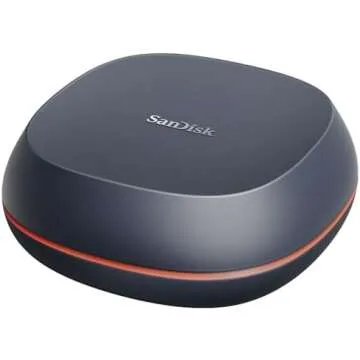
Another excellent option for those who need both speed and capacity is the SanDisk 8TB Desk Drive SSD. With a maximum speed of 1000MB/s through USB-C, it’s designed for desktop use, allowing ample storage for large files and projects. It’s perfect for professionals who demand quick access speeds without the drawbacks of traditional hard drives.
High-Capacity HDDs for Storing Memories
If you’re someone who enjoys extensive media collections, then an external hard drive might be just what you need. The SanDisk 8TB Desk Drive offers massive storage space, allowing you to archive entire photo libraries or video collections without the worry of running out of space. It’s ideal for families wanting to aggregate memories or content creators looking to manage large projects efficiently.
Additionally, for more than just basic storage, consider the Samsung T5 1TB Portable Solid State Drive. It’s compact and fits in your pocket, making it easy to take anywhere. With its sleek design and reliable performance, you can effortlessly transfer and share large files between devices, which is particularly handy for hotel room editors or remote workers.
Memory Cards for Capturing Life’s Moments
For photographers and videographers, memory cards are indispensable. The SanDisk 128GB Extreme PRO SDXC Memory Card is a top performer when it comes to capturing high-quality content. With the ability to record 8K videos and handle fast data transfers, it caters to both amateur and professional photographers alike.
If you require additional options, the SAMSUNG EVO Plus 256GB SDXC Memory Card is another fantastic choice. It supports 4K video recording and comes with an adapter, providing seamless usage across various devices for all your storage needs.
Functional Storage Organizers Beyond Drives
Beyond just electronic storage, organizational tools can make a huge difference in maintaining a clutter-free environment. The Akro-Mils 26-Drawer Plastic Drawer Storage Cabinet is perfect for conventional storage needs, whether for crafts, office supplies, or a hobby. It’s designed to keep everything neat and tidy, allowing you to find what you need quickly without sifting through a mess.
For those who travel frequently with their gadgets, the Manfrotto Advanced Active III Backpack is an essential item. It’s not just functional; it also provides great protection for your equipment, featuring padded dividers for cameras and laptops, keeping your investments safe whilst on the go.
Frequently Asked Questions
What is the difference between SSDs and HDDs?
SSDs (Solid State Drives) are faster, more durable, and tend to be more expensive than HDDs (Hard Disk Drives), which use traditional spinning disks. SSDs are ideal for performance-sensitive applications, while HDDs provide larger storage at a lower price.
How do I choose the right storage solution?
Consider the type of data you need to store, the amount of storage required, and how portable you need the solution to be. For high-capacity media files, SSDs offer speed, while HDDs suit bulk storage. For cameras, opt for high-speed memory cards.
Can I use an SSD as external backup?
Absolutely! External SSDs are great for backups due to their reliability and speed, enabling quick and efficient access to your stored files.
Are all storage devices compatible with all computers?
Most modern storage devices are compatible as long as your computer has a matching port (USB-C, USB 3.0, etc.). Always check compatibility specifications before purchasing.
Wrapping Up Your Storage Solutions Journey
In conclusion, finding the right storage device doesn’t have to be a daunting task. With a plethora of options available, you can choose based on your specific needs—whether you require speed, capacity, or portability. The products listed above aim to empower you in your storage endeavors, ensuring your data is always safe and accessible.
Explore your favorites now and discover how these innovative storage solutions can simplify your life, enhance your creativity, and prepare you to handle any data adventures that may come your way. Remember, investing in quality storage is a step towards peace of mind and organization, so go ahead and take the plunge!



 Continue with Google