


Top Stylus Pens of 2025: Ultimate Picks for iPads, Samsung, and Windows Tablets – Perfect for Drawing & Note-Taking!
"Which Stylus Pen is Best for Your Tablet in 2025?"

Stylus pens have come a long way in 2025, offering better precision, improved pressure sensitivity, and enhanced compatibility with a wide range of tablets. Whether you're looking for the best tablet stylus for drawing, the top stylus pens for note-taking, or a budget-friendly option, there's something for everyone this year. Whether you're an artist, a student, or a professional who takes notes on the go, finding the right stylus can make all the difference in your workflow.
In this guide, we compare the best stylus pens available in 2025, from premium options with cutting-edge technology to budget-friendly picks that deliver great value.
Top Stylus Pen Features & Innovations in 2025: AI, Latency, and More
Stylus technology continues to evolve, offering better performance and more intuitive features that cater to different user needs. Whether you're an artist looking for fine control, a student needing reliable note-taking capabilities, or a professional requiring seamless digital interaction, these advancements make styluses more versatile than ever.
1. AI-Enhanced Writing & Drawing
- Many high-end stylus pens now come with AI-powered assistance, offering predictive strokes, autocorrection for shaky lines, and smart shading for artists.
2. Ultra-Low Latency for Seamless Writing
- Stylus pens in 2025 now offer near-zero latency, making the experience feel as close to pen-on-paper as possible.
3. Advanced Pressure & Tilt Sensitivity
With new technology, stylus pens for tablets now recognize even the subtlest changes in pressure and tilt, giving artists and note-takers unparalleled control.
4. Universal Compatibility
Gone are the days when stylus pens worked only with specific tablets—many new models now support multiple devices, including iPads, Samsung Galaxy Tabs, and Microsoft Surface devices.
How to Choose the Best Stylus Pen for Your Tablet: Compatibility, Latency, and More
✔️ Choosing the Right Stylus for Your Tablet: iPad, Samsung, and Surface Compatibility
Make sure the stylus is designed for your tablet model. The best stylus for iPad users is the Apple Pencil (2nd Gen), while Samsung’s best stylus for Samsung tablets, the S Pen, works seamlessly with Galaxy devices. For Windows tablets, the best tablet pen is the Microsoft Surface Slim Pen 2.
✔️ Stylus Latency & Responsiveness: Best Stylus Pens for Smooth, Real-Time Writing
Opt for ultra-low latency for a smooth, real-time writing experience. The Apple Pencil (2nd Gen), Samsung S Pen, and Microsoft Surface Slim Pen 2 all offer near-instant responsiveness.
✔️ Best Stylus Pens for Pressure Sensitivity: Ideal for Artists and Designers
Artists and designers should look for at least 4,096 pressure levels for better stroke control. The best tablet stylus options like the Wacom stylus, Apple Pencils, and Surface Slim Pens provide high-pressure sensitivity for professional use.
✔️ Stylus Features & Gestures: Customizable Buttons and Touch-Free Control for Enhanced Use
Some stylus pens support touch-free gestures, customizable shortcut buttons, and even haptic feedback for a natural feel. The Samsung S Pen offers Air Gestures, while the Surface Slim Pen 2 provides haptic feedback for an improved writing experience.
✔️ Stylus Battery Life & Charging: Fast Charging and Long-Lasting Options for Maximum Productivity
Consider whether you prefer wireless charging, USB-C charging, or a battery-free stylus. The best pen for tablet such as the Apple Pencil (2nd Gen) and Surface Slim Pen 2 charge wirelessly, while the Logitech Crayon and other best stylus for note-taking on iPad use USB-C.
✔️ Best Stylus Pens for Every Budget: High Performance vs. Affordable Options
Premium tablet pens offer the best features, but if you’re looking for an affordable option, many budget-friendly styluses still deliver solid performance for everyday use.
Top Stylus Pens of 2025: Best Stylus Picks for iPad, Samsung, and Windows Tablets
Here are the top-rated stylus pens of 2025 for iPads, Android tablets, and Windows devices, carefully selected for their precision, responsiveness, and advanced features.

1. Apple Pencil (2nd Generation) Review: Best Stylus for iPad Users & Digital Artists
✅ Best for: Artists, note-taking, digital signing, and professional creatives
🔹 Key Features:
- Pixel-perfect precision with industry-leading low latency
- Magnetically attaches, charges, and pairs seamlessly
- Responsive pressure and tilt sensitivity for natural drawing
📱 Compatibility:
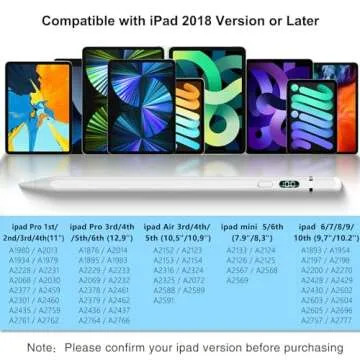
- iPad Pro (11-inch, 1st-4th Gen)
- iPad Pro (12.9-inch, 3rd-6th Gen)
- iPad Air (4th, 5th Gen)
- iPad Mini (6th Gen)
✏️ Pen Tip & Precision:
- Ultra-responsive, perfect for detailed sketches and handwriting
- No noticeable lag, making it feel like a real pencil
🔗 Connectivity & Pairing:
- Magnetic attachment enables automatic pairing and charging
⚡ Battery Life & Charging:
- Charges wirelessly when attached to the iPad
- Long-lasting battery life for all-day use
💰 Price: Premium
⭐ Why Choose It?
- The best stylus for iPad with seamless integration and professional-grade performance

2. Samsung S Pen Ultra: Best Stylus for Samsung Galaxy S24 Ultra Users with Air Gestures
✅ Best for: Precision note-taking, digital navigation, and Air Command gestures
🔹 Key Features:
- 0.7mm fine tip for accurate writing and sketching
- Ergonomic design for comfortable use
- Supports Air Command for touch-free control
📱 Compatibility:
- Samsung Galaxy S24 Ultra
✏️ Pen Tip & Precision:
- Fine tip ensures smooth and precise input
- Pressure-sensitive for natural handwriting
🔗 Connectivity & Pairing:
- Pairs instantly with the Galaxy S24 Ultra
- Bluetooth support for remote actions
⚡ Battery Life & Charging:
- Low power consumption for extended usage
💰 Price: Mid-range
⭐ Why Choose It?
- The best stylus for Samsung tablets, perfect for Galaxy S24 Ultra users
3. Microsoft Surface Slim Pen 2: Precision Stylus for Surface Users with Haptic Feedback

✅ Best for: Surface users needing precision, note-taking, and drawing
🔹 Key Features:
- Haptic feedback for a pen-on-paper feel
- Slim, ergonomic design with customizable buttons
- Magnetic storage and wireless charging
📱 Compatibility:
- Microsoft Surface Pro 8/9/X
- Surface Laptop Studio
- Surface Duo 2
- Other Surface devices with Microsoft Pen Protocol
✏️ Pen Tip & Precision:
- Ultra-precise with pressure sensitivity
- Works smoothly with Microsoft apps like OneNote
🔗 Connectivity & Pairing:
- Pairs via Bluetooth for advanced gestures and customization
⚡ Battery Life & Charging:
- Wireless charging via Surface devices or charging dock
💰 Price: Premium
⭐ Why Choose It?
- The best windows stylus for Surface users, with haptic feedback and advanced functionality.
4. Wacom LP1100K 4K Pen Review: Best Stylus for Digital Artists Using Wacom Tablets

✅ Best for: Digital artists and designers using Wacom Intuos tablets
🔹 Key Features:
- 4,096 levels of pressure sensitivity for accurate strokes
- No battery or charging required
- Ergonomic design with programmable buttons
📱 Compatibility:
- Wacom Intuos tablets
✏️ Pen Tip & Precision:
- High-pressure sensitivity for detailed sketches
- Customizable buttons for efficiency
🔗 Connectivity & Pairing:
- Works directly with Wacom Intuos—no pairing needed
⚡ Battery Life & Charging:
- Battery-free for uninterrupted usage
💰 Price: Affordable
⭐ Why Choose It?
- The best tablet pen for Wacom users, offering exceptional precision at an affordable price.

5. Best Budget Stylus for iPad: Stylus Pen for 9th & 10th Gen iPads
✅ Best for: Budget-conscious iPad users needing a fast-charging stylus
🔹 Key Features:
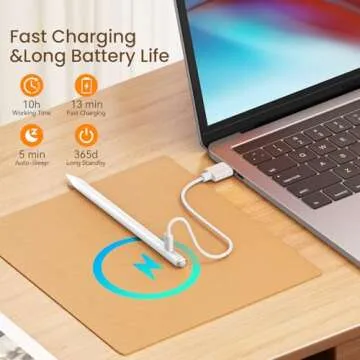
- 2X fast charging for quick use
- Palm rejection for a smooth writing experience
- Tilt sensitivity for shading
📱 Compatibility:
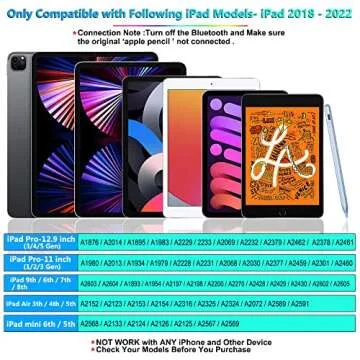
- iPad Pro 11” & 12.9” (2018-2024, M4)
- iPad Air 3/4/5/M2
- iPad Mini 5/6
- iPad 6th-10th Gen
✏️ Pen Tip & Precision:
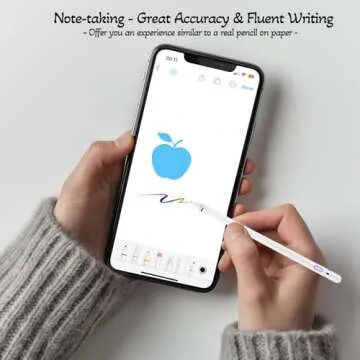
- Precise and responsive for note-taking and sketching
🔗 Connectivity & Pairing:
- No Bluetooth needed—just turn it on and start writing
⚡ Battery Life & Charging:
- Fast charging with long battery life
💰 Price: Budget-friendly
⭐ Why Choose It?
- A solid alternative to the Apple Pencil at a fraction of the price and the best stylus for note taking on ipad

6. Logitech Crayon Review: Best Stylus for Students and Casual Note-Takers
✅ Best for: Students, note-taking, and casual iPad users
🔹 Key Features:
- Tilt support for natural writing
- No pairing needed—works instantly
- Durable design with anti-roll shape
📱 Compatibility:
- iPad Pro 12.9” (5th, 6th Gen)
- iPad Pro 11” (2nd, 3rd, 4th Gen)
- iPad (7th-10th Gen)
- iPad Air (3rd-5th Gen)
✏️ Pen Tip & Precision:
- Precise and smooth for note-taking and basic drawing
🔗 Connectivity & Pairing:
- Works instantly—no Bluetooth required
⚡ Battery Life & Charging:
- USB-C fast charging for extended use
💰 Price: Mid-range
⭐ Why Choose It?
- A great alternative to the Apple Pencil for casual users, with excellent precision and durability.
How to Choose the Best Stylus Pen for Your Tablet: Our Top Picks for 2025
| Stylus | Best For | Pressure Levels | Key Features | Price |
|---|---|---|---|---|
| Apple Pencil (2nd Gen) | iPad users, digital artists | High sensitivity | Wireless charging, tilt & pressure support | $129 |
| Samsung S Pen Ultra | Galaxy S24 Ultra users, productivity | Fine tip precision | Air Gestures, touch-free navigation | $99 |
| Microsoft Surface Slim Pen 2 | Surface users, note-taking | High sensitivity | Haptic feedback, customizable buttons | $129 |
| Wacom LP1100K 4K Pen | Digital artists, Wacom tablet users | 4,096 | Battery-free, customizable buttons | $69 |
| Stylus Pen for iPad (9th & 10th Gen) | Budget-conscious iPad users | Standard precision | Fast charging, palm rejection | $39-$59 |
| Logitech Crayon Digital Pencil | Students, casual note-takers | Standard precision | No pairing required, durable design | $79 |
Best Stylus Pens 2025
Here is a quick summary of the best stylus pens for various tablet models:
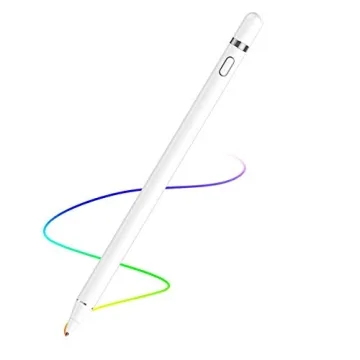
- Best Stylus for iPad: Apple Pencil (2nd Gen)
- Best Stylus for Samsung Tablets: Samsung S Pen Ultra
- Best Stylus for Windows Tablets: Microsoft Surface Slim Pen 2
- Best Budget Stylus for iPad: Stylus Pen for iPad (9th & 10th Gen)
- Best Stylus for Note-Taking on iPad: Logitech Crayon Digital Pencil
Explore more about the best tablet pens and best stylus pens to make an informed purchase for your digital art, note-taking, and drawing needs!
Stylus Pen FAQs: Top Questions About Stylus Compatibility, Performance, and More
Q1: Which stylus pen is best for drawing and
note-taking?
A1: The Apple Pencil (2nd Gen)
is the best for iPad users, while the Wacom LP1100K 4K
Pen is ideal for professional artists. For Surface
users, the Microsoft Surface Slim Pen 2 offers
great note-taking and drawing capabilities.
Q2: Can I use an Apple Pencil on a Samsung
tablet?
A2: No, the Apple Pencil only
works with compatible iPads. For Samsung
tablets, the S Pen is the best
stylus for Samsung tablet.
Q3: What’s the best budget stylus for
iPads?
A3: The Stylus Pen for iPad
(9th & 10th Gen) and Logitech Crayon offer
excellent precision, palm rejection, and tilt support at a more
affordable price than the Apple Pencil.
Final Thoughts: Choose the Best Stylus Pen for Your Tablet in 2025 – Recommendations & Tips
Still undecided? Click here to see the latest deals on these stylus pens and find the perfect match for your needs. Whether you're looking for precision, affordability, or cutting-edge features, there's an option that suits you.
If you're an iPad user, the Apple Pencil (2nd Gen) is the best pen for tablet with seamless performance, natural drawing, and professional-grade precision.
For Samsung Galaxy S24 Ultra users, the S Pen Ultra provides excellent precision, touch-free gestures, and smooth navigation.
Microsoft Surface users should go with the Surface Slim Pen 2 for its intuitive haptic feedback and deep integration with Windows devices.
If you're an artist or designer, the Wacom LP1100K 4K Pen offers incredible precision and a battery-free design for uninterrupted creativity.
For budget-conscious buyers, the Stylus Pen for iPad and Logitech Crayon offer solid performance without the premium price tag.
💡 Which stylus do you prefer? Let us know in the comments!
Looking for the best tablet to pair with your stylus? Check out our [Top Tablets of 2025 Guide] to find your perfect match! 🚀







 Continue with Google
Reviews